Lesson 4: Introduction to the DynRM Resource Manager
DynRM is a modular resource manager written in Python and is part of the DynRes software project. It supports the DPP design principles for dynamic resource management. DynRM is developed to support research on novel, dynamic scheduling optimizations.
Modular Architecture
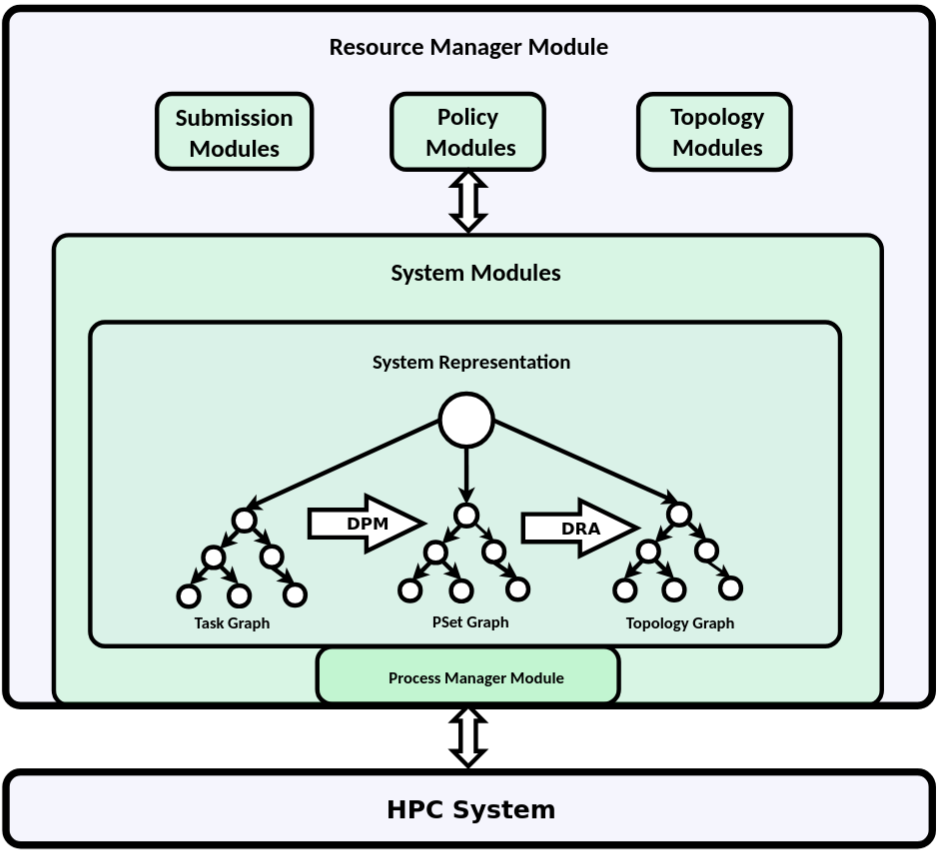
The modular architecture of DynRM allows simple customizations/extension to target particular use case scenarios. I.e. custom modules can be written and used with DynRM for the following components:
resource manager
system
process manager
policy
event loop
RPC
logging
submission
topologies
performance models
COL creation
…
DynRM uses a graph-based system representation:
Topology Graph: The topology graph contains system components (such as nodes, cores, …) as vertices and relations between components (such as containment) as edges. When only considering containment relations, the topology graph is a tree.
Task Graphs: The Task Graphs represent user submissions, i.e. a set of one or more jobs/tasks (vertices) possibly with dependencies (edges). This representation therefore also covers workflows.
PSet Graphs: The PSet Graphs consists of Process Sets (vertices) and Process Set Operations (edges). The PSet Graphs establish a mapping between the Task Graphs and the Topology Graph and is the basis of the DPP-based approach for dynamic resources.
Commands
While a completely custom DynRM instance can be created via the Python API, DynRM provides a high-level command to run experiments with limited options for customizations:
dynrm_run [OPTIONS]
    OPTIONS:
        --topology_file=[path/to/file]          // Path to file containing the topology description (yaml)
        --submission_file=[path/to/file]        // Path to .batch or .mix file containing the topology description (yaml/csv)
        --policy=[policy_class]                 // Name of the policy class to be used for scheduling
        --policy_params=["{'key': 'val'}"]      // Python dictionary containing policy parameters
        --verbosity=[verbosity]                 // Verbosity level to be used for printing
        --output_dir=[dirname]                  // Name of the outputdir to store DynRM logging data
Examples:
topology_file.yaml:
topology:
nodes:
    n1:
        num_cores: 8
    n2:
        num_cores: 8
submission.batch:
tasks: # Define the list of tasks of the workflow
    -   name:  "Expand Task" # The name of the task
        executable: "/opt/hpc/build/dyn_rm_examples/submissions/sleep_expand_dynrm_nb.sh" # The task executable
        arguments:
            - "arg"
        # Parameters for initial launch
        launch_generator:
            function: "output_space_generator_launch"       # Output space generator function to use
            model: "AmdahlPsetModel"    # PSet Model to use
            model_params:   # PSet Model parameters
                t_s: 1
                t_p: 300
            mapping : "dense"   # Use all cores on node, other options: 'sparse' -> 1 proc per node, 'N:node' -> N procs per node
            num_procs : 8       # Number of processes to start with

        # Parameters for reconfigurations
        generators:
            - key: "replace_generator"      # key to be used to reference this COL info
              function: "output_space_generator_replace"
              model: "AmdahlPsetModel"
              model_params:
                't_s': 1
                't_p' : 300
              num_procs_add: 8  # Allow adding exactly 8 procs per reconfiguration
              mapping: "dense"
submission.mix:
Arrival Time |
Batch file |
Parameters |
|---|---|---|
1 |
/opt/hpc/build/dyn_rm_examples/submissions/job1.batch |
|
20 |
/opt/hpc/build/dyn_rm_examples/submissions/job2.batch |
|
40 |
/opt/hpc/build/dyn_rm_examples/submissions/job3.batch |
{‘terminate_soon’: True} |
Hands-On
Change to the ‘dyn_rm_examples’ directory.
(tutorial_dynreshpc26) [mpiuser@n1 mpi_tests]$ cd /opt/hpc/build/dyn_rm_examples
Example 1:
In our first example we will run a single job:
on a system with 8 nodes, each with 8 cores
which starts with exactly 8 processes
mapping: 1 process per core
allows adding exactly 8 processes per reconfiguration
scheduled by the Discrete_Steepest_Ascend [sic] policy
(tutorial_dynreshpc26) [mpiuser@n1 dyn_procs_setup]$ time dynrm_run \
    --topology_file=topology_files/8_node_system.yaml \
    --submission_file=submissions/expand.batch \
    --verbosity=3 \
    --output_dir=expansion_test \
    --policy=Discrete_Steepest_Ascend \
    --policy_params="{'step_size': 'single'}"
Example 2:
In our second example we will run a job mix:
on a system with 8 nodes, each with 8 cores
with 3 static jobs each requiring 6 nodes
uses 1 process per core
scheduled by the static EasyBackfilling policy
(tutorial_dynreshpc26) [mpiuser@n1 dyn_procs_setup]$ time dynrm_run \
    --topology_file=topology_files/8_node_system.yaml \
    --submission_file=submissions/mix_demo.mix \
    --verbosity=3 \
    --output_dir=mix_static_test \
    --policy=EasyBackfilling \
    --policy_params="{}"
Example 3:
In our third example we will run a job mix:
on a system with 8 nodes, each with 8 cores
with 3 dynamic jobs without contraints on number of processes
all jobs have the same scalability
mapping: 1 process per core
scheduled by the static Discrete_Steepest_Ascend [sic] policy
(tutorial_dynreshpc26) [mpiuser@n1 dyn_procs_setup]$ time dynrm_run \
    --topology_file=topology_files/8_node_system.yaml \
    --submission_file=submissions/mix_demo.mix \
    --verbosity=3 \
    --output_dir=mix_dyn_test \
    --policy=Discrete_Steepest_Ascend \
    --policy_params="{'step_size': 'linear'}"
Ongoing & Future Work:
Intra-node scheduling
Co-scheduling
Carbon-Aware Scheduling
Patch for LibADR tutorial:
(tutorial_dynreshpc26) [mpiuser@n1 dyn_procs_setup]$ dynpkgs pkg_reinstall ompi && sed -i 's|#define MPI_MAX_INFO_VAL[[:space:]]*OPAL_MAX_INFO_VAL|#define MPI_MAX_INFO_VAL 10000|' /opt/hpc/build/ompi/ompi/include/mpi.h && cd /opt/hpc/build/ompi && make -j8 all && make -j install
(tutorial_dynreshpc26) [mpiuser@n1 dyn_procs_setup]$ cd /opt/hpc/build/dyn_rm && git pull && dynpkgs pkg_reinstall dyn_rm
(tutorial_dynreshpc26) [mpiuser@n1 dyn_procs_setup]$ rm -rf /opt/hpc/build/libadr /opt/hpc/install/libadr && dynpkgs pkg_install libadr
(tutorial_dynreshpc26) [mpiuser@n1 dyn_procs_setup]$ python3 run_test_dynrm.py --topology_file=2_node_system.yaml --submission_file=example_basic.batch --verbosity=3 --output_dir=expansion_test --step_size=single